YouTube has tons of things like this for Steve Balmer, it is really nice, I like this guy :D
he is Amazing
Ballmer sells windows1.0
Steve Ballmer Sells Windows XP
Steve Ballmer on Vista and MacBook Air @ MIX08
Math Matters to Microsoft CEO Steve Ballmer
Thursday, November 13, 2008
Thursday, September 18, 2008
Debugging in Windows live
(The post is not completed yet, and I don't feel like I want to write more, please pray for me.)
Peace be upon you
While I was digging in windows stuff I have found very good way to debug in Windows, but in first place why you or me may need to debug in windows, simply because of crash analysis, sometimes you need to know from the crash came, the source of the problem as long as you are sure that you didn't do anything wrong, you go deeper to have a run with the system over the debugging way, it will end up with clear conclusion about the problem and causes, let see how to do it.
First when you start up the Windows press F8 and select debugging mode from the boot menu

After that you may need to generate a crash as test crash to practice your self on such thing, to do so you have to do small trick that is provided by Microsoft ,
go to registry editor (Regedit) and navigate to this path
HKEY_LOCAL_MACHINE \ SYSTEM \ CurrentControlSet \ Services \ i8042prt \ Parameters
Then add the DWORD Value and name it "CrashOnCtrlScroll" and set its value to 1
restart your machine, and Press Ctrl and press Scroll Lock twice, then you will get this nice BSOD (Blue Screen Of Death)
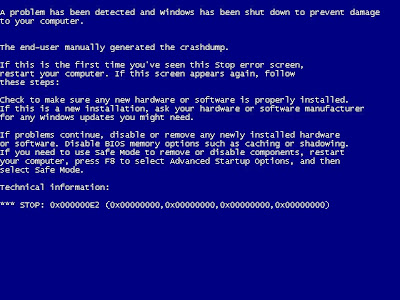
restart your machine, and Press Ctrl and press Scroll Lock twice, then you will get this nice BSOD (Blue Screen Of Death)

if you enable the Debugging mode this screen will be waiting until you start debugging it.
to start debugging the machine, you have to connect the crashed machine with the debugging machine and connect them together through the serial cable,


Thursday, August 21, 2008
iPhone with Arabic
Peace be upon you
how are you guys? I am very sorry for the long time not posting, but I am really so busy this days, anyways, let us head to the point.
I have got a new book for iPhone development, I have started reading some articles about it and I really like it very much, it worth the effort.
The first thing came to my mind is to show Arabic strings to the screen of the emulator, and the shock was that iPhone doesn't support Arabic, for me I started to work on the emulator and XCode until I finally did it, now I am able to show Arabic in my application on the iPhone, for me it is very important as there is a lot of development will be done on such device and of course it will need Arabic, Here is snap shoot for the emulator after writing the word ALLAH.

Thanks to ALLAH that I did, it was nice try and I learn a lot to just show this word on the emulator.
I hope that I can do something useful to my Arabian bothers and sisters, this is just a step, I will work to get deeper into the system and provide you with open source solution to support Arabic on this magnificent device.
Now I really need to sleep, thanks for reading :)
BR
Ahmed Essam
Subscribe to:
Comments (Atom)